Hotkeys require a range of voodoo to get to work reliably mainly because there are a range of different ways to get the input events from the hotkeys - each laptop seems to do this differently(!).
So when a hotkey does not work, it can be a little daunting to figure out exactly how a hotkey is wired up and hence how to make it work. Fortunately there is a Ubuntu wiki page describing how to track down and sort out hot key issues.
The wiki
https://wiki.ubuntu.com/Hotkeys/Troubleshooting has a quick run down on the components involved in handling hotkeys and a step-by-step troubleshooting guide to walk one through diagnosing and fixing problematic hotkeys.
If you want to understand the underlying architecture it's worth checking out
https://wiki.ubuntu.com/Hotkeys/Architecture for a run down on the different ways hotkeys have been handling in Ubuntu Karmic, Jaunty, Intrepid and Hardy. Below is the current architecture for Karmic:
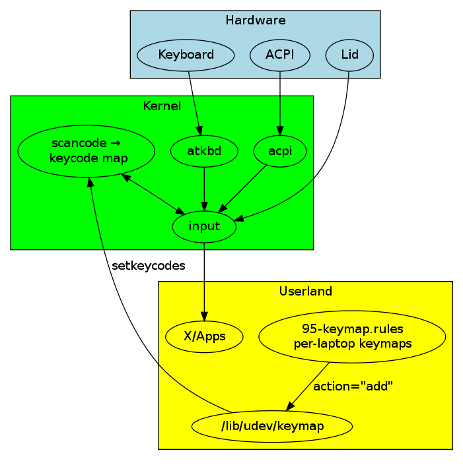
As you can see, it's rather a complex affair. I recommend following the Wiki pages if you have any hotkey issues - hopefully this will enable you to fix any of those hotkeys that just sit there and don't seem to work on your laptop or netbook.

